Showing posts with label Tips And Tricks. Show all posts

Tuesday, 25 April 2017

Speed Up Your Browser By Changing Your DNS

Most people use the default DNS settings provided by their ISP, and while they are usually sufficient for most purposes, there are plenty of free options out there, like OpenDNS and Google DNS. Namebench is a free app that checks to see whether your current settings are optimized and, if not, which free option is best for you. Here's how to use it:

Download and install Namebench.

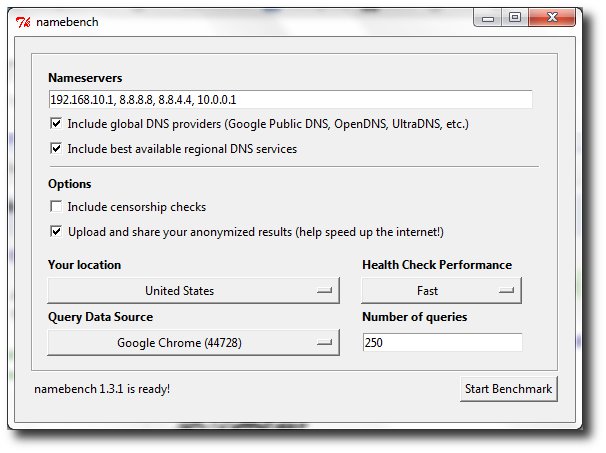
Fire it up and choose your settings. Keep the top two boxes checked. If you're concerned about network censorship, check the third box, and if you want to help the developers, check the last box. You can tweak the rest if you're outside U.S. or want to experiment with different browsers.

NameBench Dns

Click Start Benchmark and wait while Namebench runs its tests. It should take several minutes. A browser tab should pop open when Namebench is done and give you a list of DNS servers and how much faster they are than the one you're currently using, unless yours are already the fastest possible.

Namebench does not change your settings, but it's generally pretty easy to do it yourself. Check with the instructions you got from your ISP to set up your modem and/or router and just substitute the DNS addresses you received from Namebench for the addresses given by your ISP. It's best to do this with your router, as it will assign that DNS address for all the devices attached to it.

That's it! This can dramatically improve your browsing speed, and it's fairly easy to work through.

Tuesday, 11 April 2017

Submit a Complete Sitemap of your Blogger Blog to Google

Generate a Complete Sitemap for your Blogger Blog

Step 1: If you haven't done this already, sign-in to your Google Webmasters account and add your blog. For details, check this video tutorial on how to add a blog to Google.

Step 2: Once your blog is added to Google, open the Sitemap Generator and type the full address of your blogspot blog (or your self-hosted Blogger blog).
submit sitemaps

Step 3: What you get is list of sitemap files that contain each and every page of your blog. You now just have to ping Google, Yahoo and Bing to inform them about these XML sitemaps.

Monday, 3 April 2017

5 Factors why a blog is important for your Business

Today’s world when everything is just a click away, you sure are missing something it you do not have a blog for your business. It is a simple way to connect to your customers and others who are professionally linked to you in one way or the other. The following are few of the many ways in which a blog can help you with your business. It’s the perfect tool for promoting your enterprises and this is not all. There are so many reasons why you must have a blog for you business.

5 Factors why a blog is important for your Business

Reach out to those who matter

Blog helps you to reach out to your customers and others who matter to you professionally. You can keep them informed on what is new and ask for their feedback for the productions you deal in. get to know what your customers are looking. This will definitely add efficiency to your business.

Search engines will highlight your blog

Suppose your company has a website, you can write a blog which is included in that very website. Constantly updating the blog will really be beneficial for you as the search engines would then give relevance to your website. The more relevance thesearch engines give your blog, the more readers it is likely to have.

Blogging lets you help your customers

You can easily attend to the queries of your customers through your blog. You can write detailed posts answering all the questions which your customers put up. Suppose more than one customer has the same question, one single post can tackle them all and you need not waste time attending to the same question again and again. This way blog helps you to attend to your customers in a smart way.

Promoting a well-managed blog brings in customers

Social Media is one of the best ways for promoting your business. Social media helps you connect with a number of customers. You can promote your blog through the popular social networking sites or other sources of social media. Having a well written and well managed blog will bring you more and more followers and once they are impressed by your blog, they will recommend it to others as well.

Show them what you got through your blog

A well-managed blog will help you establish a good reputation. The customers will love to associate to you after realizing that you love to reach out to you customers and stay connected with them. Also, the blog can give you a platform where you can display your knowledge about the business or the product you are dealing in. A strong reputation in the market is vital for your business to flourish and a blog can help you do so.

Conclusion

A ‘well managed’ blog can do wonders. If you run a blog for your business make sure you update it frequently and the posts you put up contain relevant information. Most enterprises these days do have a blog and you sure are lagging behind if your business does not have a blog yet. Make a blog to promote your business right away. This is one method which will definitely work.

Sunday, 2 April 2017

Simple But Amazing Tricks In PC


Simple But Amazing Tricks In PC

Go to Run command and type ... See what it opens

Type 3 Dots ... See what it opens

Type 2 Dots .. See what it opens

type 1 Dot . See what it opens

Harmless small trick.. Use it for fun..

Open Microsoft Word

Put this =rand(200,99) then Press enter

Even Bill Gates dint said about this i guess !!

Seven Quick Ways to Get Traffic to your New Blog

Seven Quick Ways to Get Traffic to your New Blog
So you have setup your website, using popular CMS system or blogger, and now everything is setup but you do not have a main thing which is a traffic on your new blog. Getting traffic for new blogs/websites is difficult now days because competition has been increased in blogging since last 5 years, but don’t worry if you really satisfied with your new website then you can easily get the traffic to your blog, just follow the below tips and you will start getting visitors to your website.

Update your Site Regularly

You need to post something latest and new to your website daily so you can attract visitors. Use keywords in your post but don’t spam your blog with keywords only try to use the high potential keywords in your sentences and it will attract visitors on to your website.

Post Link in a Forum Signature

Post your link in a forum signature that is related to your niche. Make sure that your post should be well maintained and informative so the users are going to click on your link also the post should be related to your niche of your website and the user is definitely going to click on your link.

Backlinks

Backlinks are also sometimes called ‘Incoming links’. Backlinks also helps you to keep track of webpages that redirect to your website/link . It will also ping your website to the search engines so be sure to build backlinks and these are the important aspect of SEO or getting visitors.

Submit your Link to Directories

Directories are the where all the websites of the same niche or category are together, For example you are searching for Technology related websites and you will go to any web directory and visit the Technology category and there you will see all the technology niche websites are there so It will help you find sites easier, so submit your website to link directories and It will attract visitors. Submitting your link to web directories also help to build backlinks.

Guest Writing/Article Submission

To attract more visitors you can also write guest articles for the blog and submit to the admin for the publishing of the article. Also make sure that for the blog you are writing article has great PR (Page rank) and also gets daily great visitors, so your guest article do not waste.

Classified Ads

This method requires you have to money. You can advertise your website to Google AdWords and other advertising networks so that your banner or link will be placed in front of thousands of visitors and half of them will definitely click on your link.

Social Bookmarking

Bookmarking your blog to social media websites such as StumbleUpon, Digg.com will definitely get your good amount of daily visitors to your website, so whenever you post quality content don’t forget to bookmark it to the great social bookmarkers. Below are the popular bookmarking website.

  1. Digg.com
  2. Del.icio.us
  3. Stumbleupon.com

So above are the methods which will definitely work for bringing visitors to your website. Visitors means Money so you will also make more money. If you have applied the above methods then I am sure that you will increase your daily visitors.

Tuesday, 28 March 2017

How do I improve the Alexa rank for any website?

How do I improve the Alexa rank for any website?

What can Improve your Alexa rank ?

1) Install Alexa toolbar into your browser
This can improve, as Alexa panel consist from add-in toolbars  (and more ). using the plugin in your browsers can get you counts. every visitor coming to your webpage with the toolbar installed, will also count.

2) Install Alexa Widget
Will a widget help you ? not according to Alexa.
Even so, I do recommend installing it , as there were bloggers showing improvement by using it and this a small thing you can do.

3) Write fresh high quality content
Maybe my best advice for you. content, content, content!
yes, this what can help you most to get more visitors, sales, better ranking and higher Alexa rank.Good content is what both users and search engines are looking for.

4) Write Original and engaging content
Engaging content is something that motivates people to do something with it. if you write that you're giving free ebook in your website and some one liked it, most changes he want to share it with a friend. that is engagement.
something that people need and seeking all the time.

5) Have relevant sites link to your website
Put it simple, backlinks. you want to have relevant, industry links pointing to you.
That's one sign telling search engines how good your site isthat's mean you have something.

6) Use driving traffic keywords
 Shortly ,What is called on page seo. improve the keywords and optimize them on the page.

7) Buy Alexa Traffic
If you want to improve you rank shortly- buy traffic. but, as you stop it- expect to return soon to your original rank.

8) Have better SEO optimization
Work on all factors that matter to search engines. like: speed, mobile, keywords, etc...

What have you learned from my answer ?
Alexa want you to improve your rank naturally as possible. All the list points are things that can help you with this (except buy).

Last Question (maybe should be the first)
Why you want to improve your Alexa rank ?
You want that from the reason your website exist, maybe  to sell something, to get people know you, to show expertise, etc...
So, please try to make your website better and helping people in what you can- this is the true way to improve your Alexa Ranking.

Saturday, 18 March 2017

SpectroCoin Review: Easiest Way to Buy Bitcoin and Spend Bitcoin Shopping

SpectroCoin Review: Easiest Way to Buy Bitcoin and Spend Bitcoin Shopping

This SpectroCoin review will dive into the features of SpectroCoin that make it stand apart – ability to hold multiple currencies, and use them to buy Bitcoin, and also its Bitcoin Debit Card which is as versatile as it gets when you want to use your Bitcoin to shop everyday. As Bitcoin expands in scope and use, there are many services that allow you to buy Bitcoin, sell Bitcoin, hold Bitcoin, and spend Bitcoin – essentially all the functions that you’d normally do with your own money. However, what makes SpectroCoin stand out is that it is able to do all these functions and more in the simplest way possible.

As a reminder, we do not recommend holding significant amounts of Bitcoin in any online wallet or service, even SpectroCoin. If you’re holding for the long-term, you should buy Bitcoin, and transfer it to a wallet whose private keys you control. If you hold significant amounts of Bitcoin, we strongly recommend getting Bitcoin hardware wallets.

Now let’s dive into the SpectroCoin review.

Note: This is a sponsored review by SpectroCoin.

Multiple Currencies to Buy and Sell Bitcoin

SpectroCoin allows you to hold multiple currencies. This is a feature severely lacking in many other Bitcoin services. Even the most popular of all, Coinbase, won’t allow you to hold multiple currencies. At SpectroCoin, you can hold US Dollars, British Pounds, and Euro. This is important to me, as it reflects the global nature of Bitcoin. It is also common in Europe to have multiple currencies (GBP and Euro, for example) and bank accounts with multiple currencies.

Spectrocoin accounts

Once you fund your account with USD, GBP, or Euro, you can buy Bitcoin or sell Bitcoin directly from the interface. The price is competitive and updated real-time. You will know the price when you’re buying or selling.

Buy Bitcoin SpectroCoin

Selling Bitcoin is very similar as well. If you’re depositing government currencies (USD, GBP, Euro), you need to fill in the profile with your personal details. This is actually a very good feature – you can register for SpectroCoin without providing identifying information. You only need to give this information when doing specific tasks like buy Bitcoin from the interface. This is a good privacy feature.
To transfer government money into your account, you can use a debit card, a credit card, or use a bank wire. SpectroCoin is one of the few ways you can use a credit card to buy Bitcoin.

Multiple Countries

SpectroCoin supports more countries than most other services out there. Remember though that the currency options are still limited to USD, GBP, and Euro. However, someone from Algeria or Qatar can still buy Bitcoin from SpectroCoin. You can see the list of all supported countries here. Again, if you’re in the US or Europe, you can probably use Coinbase, but outside of that, such services are limited. SpectroCoin is as good an option for US and Europe as it is for the rest of the world.
However, do remember that SpectroCoin will comply with EU regulations irrespective of where you’re physically located. This means you may be asked for state-issued identity, like a passport, to use some of the services like buying or selling Bitcoin, or transferring funds.

Bitcoin Debit Card to Spend Bitcoin

This part of the SpectroCoin review is for its debit card service. It is one of the few issuers of global Bitcoin debit cards. You can use the SpectroCoin debit card to shop regularly, or to withdraw cash at ATMs. If you hold Bitcoin in your SpectroCoin account, then they will automatically sell Bitcoin when you make a purchase with your SpectroCoin debit card.

Spectrocoin debit card

If you want to use the Bitcoin debit card, you should know about the fees. They charge $1 a month as service fees, and $9 shipping fees. There are other fees like conversion and forex fees. You can see the full set of fees here. A Bitcoin debit card is a great way to spend Bitcoin. You can also use the debit card to get cash out of ATMs globally, although I find the fees to be high.

Friday, 17 March 2017

How to access host file system from VirtualBox installation


You can use VBox shared folders and map what ever you want in the guest.
for the Windows world you can follow these instructions.

Process to share a folder for Windows Guest.

  • Close the guest (shutdown)
  • Open the VirtualBox program and click once on the guest.
  • Click settings and then click on shared folders.
  • Click the folder with the green + to add a new share
  • Click the down arrow on the folder path then click the Folder that says other.
  • This brings up a browse window. Browse to the folder that you want to share and click OK.
  • This will put the full path in your folder path line
  • Click on the box just below that and type shared then press enter.
  • At this point you have created the shared folder.


Now open (start) the guest.
Click the program start button and then open a command window or click in the run box and type cmd and press enter.
Put this in the command window: net use x: \\vboxsvr\shared -p and press enter
After this the share will show in the file manager as a mapped drive.

All of this is assuming that you have the guest additions installed. If you don't then it will not work for you until you do install the guest additions.

Friday, 24 February 2017

How To Record Android Screen with Apps

Have you seen the video of people playing games Android on youtube and how do they record the games they play before doing the uploads on youtube or a video toturial of a review or how to use android applications. To record the screen smartphone already there are many applications that you can use and is available in the market like the playstore. The way used to record the screen is also not hard and all you need is to download the application to record the screen of android that is appropriate for you. However a chance this time, we will discuss some of the applications that you can use to record the screen or the display of your smartphone. On this occasion will also be discussed how to use the application so that you're more likely to choose a screen recording application that is suitable for your use.

How To Record Android Screen with Apps

How To Record Android Screen with Apps

1. REC.

The first application we will discuss is the REC. This application is an application that you can download in the playstore and you can use to record the screen android smartphone. This application has some advantages such as the look of the application REC. elegant and has a user friendly display. In addition, the application also has advantages for recording and no just pictures or video, but audio from your smartphone can also be recorded using this application. How to use this application for recording screen display android smartphone is not difficult and it has been customized for the user. You only enough to launch the application and adjust settings such as the duration and the bitrate to your liking. If you've done setting on this application, the next step is to record mouse button to begin the process of recording the display screen android smartphone.

2. SCR Screen Recorder

Other applications that you can use to record is SCR Screen Recorder. This application is different from the other applications because these applications do not have the look of the interface. For navigation, the application only have three buttons that you can use like settings, record and exit so user will not was puzzled as to use this application because it is very simple to use. The user will not have difficulties to record using this application. You simply press the button to start recording process records automatically. For indicators when the application is running, there is a shortcut that's located on the right side of the screen android smartphone. Once you're done recording, the application will perform the rendering of video recording automatically and you're ready to play.

3. Shou.TV

The third application we will discuss on this occasion is the Shou.TV that you can use to record the screen display smartphone android and you also find this app in the market that are already provided by google i.e playstore. The application of this one has a lot of advantages so that this application becomes has recommendation to use record display screen android smartphone when you create the tutorial application or game and uploaded to youtube. This application has the advantage on a recording that belongs to a very nice and clear. In addition, the good news of this application are the users of the android platform 5.0 or a lollipop is often said not having to do a root on their smartphone. So maybe Shou.TV application is an application for recording video dri display screen android smartphone that you may have to download and try this application.

From some application for recording Screen Android we've discussed are still many similar applications available in market playstore. However, the application is probably the third application that you should try first. Good luck and thank you.

How to Modify Android Smartphone into a Mouse and Keyboard

The current development of the smartphone is very fast. With the advent of the android platform which is freely marketed, an awful lot of the smartphone manufacturers equip their devices with the Android platform that many smartphone users who use Android as their smartphone platform. In addition, some applications or games for Android is already widely available in the market like the playstore which can be accessed by all users of Android and select all applications or games they need. Smartphones today are not just to do communication, internet, media and entertainment, but also can be used as a media or tools. Android smartphones can be used into the TV remote and it still has a lot of functions that you can use. For example on this occasion that will be discussed is making the smartphone as a mouse and keyboard for your laptop or PC.
BKeyboard.jpg

How to Modify Android Smartphone into a Mouse and Keyboard

There are many ways that you can do to change your Android smartphone into a mouse or a keyboard to a computer that uses technology from intel.
  1. The first step you have to do is to download the Intel ® Application Remote Keyboard that will be installed on your smartphone and you also have to download the Intel ® Remote Host Keyboard App that will be installed on the device of your computer. So, you should perform a download two applications to be installed on the computer and smartphone devices.
  2. After you do download and install two applications on Smartphones and computers, make sure that the WiFi network connections on both the active device.
  3. The next step is to get into the smartphone you have and select the device your computer or PC you will use my father learned so both devices can connect using WiFi network and you have to do is perform a QR code using the camera Android smartphone then follow some instructions.
  4. After you follow the instructions to finish, the Smartphone you have already get used to the keyboard and mouse devices.
In addition to using the Intel ® application Remote Keyboard application, there are still many ways that you can do to change your Android smartphone into a mouse. Other examples are the use of applications of remote keyboard/touchpad gPad. The second way you can also use it to change your Android smartphone into a computer keyboard or mouse.
  1. The first step you should do is to do a download application gPad remote touchpad/keyboard to be fitted pad smartphone belongs to you and you also have to do the download of the client server gPad which will mounted on device PC or MAC you have.
  2. After two such applications you download, the next step is to install an application to your PC and smartphone devices. Next is to do the connection the two devices using Bluetooth or WiFi, you can also use the USB cable.
  3. Once both devices are connected, then the application is opening gPad on PC or Mac.
  4. Once the application on the computer is opened, open the application tersapat on Android smartphone and enter the settings menu and select the Connection type which we will use e.g. using USB cable, Bluetooth or Wifi.
  5. Next step is to go back to the settings menu and make sure the selected menus of yesteryear are already relevant to USB, Bluetooth, Wifi and click Scan.
  6. If on the instruction there is a settings page to enter an IP address, then we should be easy to enter the IP address of your computer or Mac that we use.
  7. Go to the main menu on the application on gPad Android smartphone and click the touchpad.
  8. Next you can already use the Android smartphone into a mouse or touchpad to your computer or Mac you have.

How to increase the RAM of your Android smartphone

The Easy Way To Add Android RAM
The current Smartphone also became a trend and lifestyle to its owner. A lot of people who could not leave because the current smartphone in addition to its function as a tool of communication, Smartphones also becomes a medium of entertainment such as music, film, video or gaming. Supporting a variety of applications have been available to pamper smartphone users. However, if you install too many apps or games will make the performance of your smartphone become heavy. To do the process performance, android smartphone powered by memory, also called RAM or Random Acses Memory. The function of the RAM is to save while the process is running from cips named processor. RAM can also be used to support multiple application performance at once so if too many applications, the RAM will also the smartphone has a heavy and slow down performance. On this occasion, it will be discussed how to increase capacity of RAM so that the process of your smartphone will be faster.

Temporary memory or often called RAM has a very important role when running the android operating system is an example. To get a good performance and seamless, an operating system require the support of RAM that has sufficient capacity and also has a nice speed reading. If you have several applications running and smartphone RAM that you have been insufficient, the process will feel heavy and the solution is you must add RAM on your smartphone. However, on this occasion not to discuss how to add RAM in the form of hardware, but it will increase capacity of RAM using some applications already available in the playstore. How to add RAM capacity of your smartphone using this application is quite easy. Users just need to do download the application and install the ni on android smartphone users. You can perform a download for this app on various websites or a market that has been provided by google i.e playstore. After the application's Ram Manager Pro is already installed, the next step is to make sure a file with the name of swapfile has been located or stored on the SDcard and after that you can use this application with different mode you want. The existence of such applications, we can increase capacity of RAM so that Smartphones have room to do more performance.

The Easy Way To Add Android Ram

1. Swapper


The first application to add RAM is a swapper and you can find this application in the playstore. When you will add to the capacity of RAM using this application is the first step you have to do is do a download application swapper. The main function of this application is to add swapper virtual memory so that it can be used for the performance space of RAM. If you want to use the application, we recommend you this swapper must select memory speed as read/write capabilities. In addition to using swapper, there are other applications that can be used namely sd booster. The user will easily use this booster sd because users simply plug and do some configuration. To do the configuration, users simply fill the cache size in accordance with the will of the user and after that the user can select set on bots that have the function to maintain the value of the cache that is already set and save the cache value.

2. RAM Manager Pro


A similar application that can be used to increase the capacity of RAM is the ram manager pro. The application of this one into a selected application many people to increase RAM so that a little speed up the performance of the Smartphone. This application is able to use to improve the performance of smartphone with android platform and be able to use to keep the performance of the operating system in order to remain unstable. This application also has several features to speed up performance of smartphones such as giving some mode that you can use. When performing the addition of RAM capacity on android smartphone does require time depending on the speed of read SDcard

Probably from the second sample application that already described, there are many other similar applications and you can use to increase capacity of RAM smartphone. However, the first recommendations you should try is the second such applications because Swapper and RAM Manager Pro is an Application Enhancer capacity RAM is the most widely used.

Saturday, 18 February 2017

Top 15 Search Engine Optimization (SEO) Techniques I Forget to Do

Top 15 Search Engine Optimization (SEO) Techniques I Forget to Do

Search Engine Optimization is a very hot topic on the World Wide Web. After-all, everybody wants to rank higher and come up on the first page of Google search and get more traffic.

Sometimes it is easy to get carried away with SEO though. In my opinion, the best technique is to keep it simple and apply a bit of common sense.

Most SEO plugins will take care of the common architecture related stuff for you. So in this article I will only focus on techniques that you need to do yourself (or be aware of).

I have identified and made a list of top 15 SEO practices that I tend to forget quite often. These simple SEO techniques, if practiced properly, can make a significant difference as to how my pages are ranked in the Search Engine Queries.

  1. Use proper anchor text for inter-links. Don’t use “here”, “there” etc for the anchor text (if you can avoid it).
  2. Optimize the images, always create alt tags and write description in the alt tag.
  3. Use search engine friendly permalinks. Try not to have too many ‘&’, ‘?’, ‘!’ etc characters in the URL. Sometimes it is unavoidable but try to keep it to a minimum.
  4. Use hyphens (-) between words to improve readability.
  5. Do not use underscores (_) in URLs, use hyphens (-) instead.
  6. Do not use session id in URLs. If you are using good hosting then you shouldn’t have to worry about this one.
  7. Avoid using capital letters in URLs. Windows servers are case sensitive. Keep them lowercase so there’s no confusion.
  8. Use internal linking when possible and appropriate.
  9. Use sticky posts (if you can and if it applies to you).
  10. Have a category description paragraph.
  11. Let the visitors subscribe to category specific RSS feed. (Use category specific RSS plugin for WordPress)
  12. Use rel=”nofollow” tag on low value links to not pass the page rank juice. For example “Read the rest of the entry”, “About”, “Contact” etc.
  13. Use sub-directories rather than sub-domains when possible. Sub-domains do not share link love from the main domain as it is treated as a different domain.
  14. Research the target audience and aim the site content appropriately.
  15. Keep the content up to date. Visitors don’t like outdated content. Updating the content frequently also attracts the Search engines spiders to index the web pages frequently.
Going forward I will try to use this list to optimize my web pages.
Here is a list of articles you should read to learn more SEO techniques:

Top 13 Social Media Likes/Traffic Exchange websites

Nowadays, social media optimization (SMO) is treated as one of the most important activities when it comes to driving traffic towards money website.

There are numerous social sites available on the web which are visited by individuals every day. Most likely are Facebook, YouTube, Twitter, Pinterest, myspace etc.
social media share websites
These sites provide the best and simplest platform to show online presence and push your business into high peaks. For the newbie, it is not easy to establish a reputation in front of competitors.
Nobody wants to like, share or follow any profile who has very few fan followers whether they are on Facebook or on another social website.
There are lots of social exchange websites which provide you fan followers. Addmefast is the most popular website where you will get quick likes, shares and followers.
It’s highly recommended to use social media likes/traffic exchange websites like Addmefast for startup profiles. In Addmefast, you will get points when you like someone and in return if someone like your profile points are deducted from your account. More you like others more likes you get.
Lots of start up business profile uses advertising or hire a freelancer to get likes or followers, these social exchange sites are best for those who started their profile from zero.
With social exchange websites you will get fan followers within minutes, but there are some disadvantages of the using these sites like people who follow you have no interest in service offered by you, people unfollow after some time.
In the end, social traffic exchange websites like Addmefast are best for startup profile. So don’t use them for a full-time, try to get real fans by writing eye caching posts and by doing more share, like, comments on niche based profiles, groups etc.
Below is the list of some social media likes/traffic exchange websites like Addmefast. All sites give free points to new users, register for all of them and you will easily get 50-100 likes:-
  1. Addmefast
  2. Shareyt
  3. SocialClickers
  4. Fan4Fans
  5. Youlikehits
  6. Likeforlike
  7. LikeNation
  8. Traffup
  9. HitforHit
  10. Socialclerks
  11. Share-ex
  12. Socialmediaexplode
  13. Hitslikestweets
  14. Twiends
  15. Enhanceviews
  16. Vagex

Friday, 17 February 2017

How do you contact Facebook about a problem?

Is there any way to email Facebook with a problem, or inquiry regarding our own account?

californian number seems to be not working but you may try it but the best way to reach those people to visit their headquaters

Facebook Corporate Secretary 1601 Willow Rd. Menlo Park, CA 94025

Phone Number: You can contact Facebook headquarters at 1-650-308-7300.
or to view some videos where you can learn how you can contact them

https://www.youtube.com/watch?v=G_mgfPp053k

Thursday, 16 February 2017

How can I punish someone who is illegally accessing my wifi?

How can I punish someone who is illegally accessing my wifi?

If someone is illegally accessing your wifi - kick them off! Punishment is overrated, but setting a good boundary is important. How do you kick someone off your wifi?

Do you have the technical skill and access to modify your home wifi router? (then there are multiple other answers to this question with lots of great ideas! Change SSID/password, set password, etc)

If you are not blessed with the knowledge and/or access priviledges to make the right modifications, you’re still not without options!

I just started using a very cool product called Tenedos Network Protector. You plug the device into your network, download the companion application to your phone. It takes around 24 hours to thoroughly identify all the devices currently using your network. Then if there’s something or someone that is not supposed to be there, you just block them from your phone app, with a swipe of your finger! It blocks unpermitted devices at the network level. It’s continuously monitoring, and alerts you when new devices join your network.

I’m also a Comcast customer, with their ‘fixed SSID, fixed credential’ devices - so once I give someone my wifi password, they’ve got it, and I can’t change the password without physically changing my network device. My Tenedos protector brilliantly allows me to kick off people that may have previously had access, but I no longer want accessing my network. Super easy to setup & configure.

  • Sniff traffic from their computer 
  • If they access anything illegal, turn them over to the police.
  • If they don’t access anything illegal, but do access something embarrassing (e.g., midget porn), drop a letter off at their porch with some samples of their activities. Let them know that you’d be happy to tell the rest of the neighborhood.
  • If they don’t do anything illegal or embarrassing, fall back on some of the other suggestions here (like the Upside-down Internet).

Most importantly, secure your freaking wi-fi.

How do I Increase my modem timeout?

How do I Increase my modem timeout?
    Increase your modem timeout and surf the web faster. This is really very annoying when your modem is timing out during chatting with someone special, file transfers or loading Web Pages, you might try increasing the timeout period by using this PC trick. You can resolve this issue by increasing the modem timeout setting in registry. In this Trick I am going to share a simple but very effective way to reduce timeout of a modem. For this pc tricks you have to do the following steps.

Steps for increase the timeout of Modem:

  • First of all Click on START button,and choose RUN option from the pop up Menu.
  • Then write down Regedit in the RUN. It will open your registry panel.
  • Now you have to choose HKEY_LOCAL_MACHINE option in registry panel.Then go to System as shown below in screen shot.
  • Choose System then CurrentControlSet.
  • Then go to Services after this class.
  • In class you have to choose Modem\ XXXX\ Settings Where XXXX is the number of your modem
  • In the right panel and double click on Inactivity Timeout.
  • The number of minutes for a timeout should be entered between the brackets.
  • For example, a setting could have S19=<10> to set it to 10 minutes.
    That’s all about this pc trick. This PC trick is so easy to perform.

    If you have any problem related to this Trick then Please feel free to ask in the comment section below. Enjoy..!!

15 Best Ways To Increase Your Facebook Page Likes/Fans

15 Best Ways To Increase Your Facebook Page Likes/Fans
Top 15 ways to Increase your facebook page likes or fans. Actually One of the hottest things going in marketing right now is a Facebook Page and the first thing to do when you want to use Facebook as a marketing tool is to create a Facebook Fan Page of your product or business. After you are done with that, the second thing to do is to somehow bring fans there. The big question is ‘how to do that’??

Well the answer is here in this article, as here we list Top 15 effective ways to get Facebook Fan page fans. Check them out!

Ways to Increase your Facebook Page Likes:

Tagging Pages in your Updates:

This one is simple. Just tag your Fan page (by @ sign) whenever you are updating your Facebook Fan Page’s status or are posting something and are adding a description.

Put up a featured discussion in your LinkedIn group:

If you don’t have a LinkedIn group for your industry, make one. It’s your way to demonstrate your expertise, thereby driving business to your company.
This discussion can lead to opening the doors to a higher level of customer service that you might not have otherwise had.

Link to your Facebook page on your LinkedIn profile:

One of the best places to promote your facebook page do that is in the description of your current position. When you describe your position and the company, put a hyperlink to the fan page at the bottom of the description.
If you don’t have a LinkedIn profile, you should get one. Linkedin is one of the best ways to network on a global basis and draw business to your company.

Put your Facebook page on all printed (Outbound) Marketing:

You wouldn’t send out marketing without your company name would you? So don’t forget a mention of your facebook page. All it takes is one line in a prominent location.

Put your Facebook page on all Social Media (Inbound) Marketing:

The same reasons apply here as your Outbound Marketing. It’s a way of “covering all your bases” and making sure that you reach the widest group of people possible. A great way to do this is by sending a tweet out every so often on Twitter asking your followers to also become your fans.

Leverage Your Video Blog:

Video blogs are also one of the hottest ways to connect with clients and prospects. YouTube allows you to annotate your video with links that you can use to link back to your facebook page. If your video starts to gain traction on YouTube this link can translate to significant inbound traffic to your fan page.

Mentioning Your Facebook Page on Your Personal Profile:

You can put a link to your Facebook page on your own Personal Facebook profile, so that any friends of yours that are interested in the niche of your Facebook page can like it. You can put that link in the About Me section with a little description about it.
And make sure to add http:// to your Facebook Page’s link, because the www’s are not clickable on Facebook!

Email Your Way There:

Build awareness about your facebook page in your email signature by include a hyperlink to your fan page. When you do this every person you email will have a link to your facebook page, and over time you this will effect an increase your fan base.

Let Your Website Do the Talking:

You’re already adding value to your company website by having a blog section, so up the ante and mention your fan page in directly within your content. Don’t be afraid to come right out and ask people to join your Facebook page.

Mentioning to Follow Me On Facebook Everywhere:

This is one of the most effective and easy way of increasing the number of fans on Facebook page. Always include a clickable link at the end of your post, requesting the readers to become a Fan of your Blog/Website on Facebook.
You should also add a ‘LIKE’ button either at the end or at the start of a post, as it will also make some readers become a fan. You should use this ‘Follow Me on Facebook’ on every other social networking website that you are on like StumbleUpon, Digg, Twitter, and even in your Email Signatures. Doing all these things will definitely increase your Facebook fans.

Regularly Creating and Posting Creative and Targeted Content:

You must have read it everywhere and I am going to say it again — “Content is the king!”. Always try to create good and targeted content in order to make new fans and keep the existing ones. If you have good content on your website, the readers will obviously like it after reading it and doing this would post your post on their walls. This post would then be visible to their friends and so there is a good chance that they might become your Fan too. If your fans share your posts, those posts would appear on their walls with a ‘Via your-fan-page-name’ and seeing that, your fan’s friend might also become a fan of your page.

Like Exchanging with Admin of Other Pages:

If you want you can also try doing like exchanging. Simply search Facebook Fan Pages in your niche which have a lot of fans and then contact their admins telling them that you will post a like of theirs on your Facebook Page and whether they would be willing to do the same for you. If you will like their page it will automatically appear on the left panel of your Facebook Fan page, in the ‘LIKES’ section. If they also like your Facebook Fan Page then yours would appear on those pages too.
There may be some Fan Pages whose admins may not agree for a link exchange. So you can offer them money if you want and pay them through PayPal, or Western Union.

Using Facebook as a Fan Page:

Changing your Facebook’s Personal Profile to your Facebook Page is also another effective option. You can do this from the option given on top-right side of your Facebook Page. When you click on ‘use Facebook as ‘your-fan-page-name”, you can start using Facebook as your Facebook Fan Page.This is a good way to bring in traffic to your fan page.
After you have done that you can like other pages and can comment on their photos, links, statuses and videos. Make sure that those fan pages are in your niche but have a large number of Fans. Comment and communicate with the fans of that Facebook Page and always be sweet and friendly as this will bring them to your Facebook Page. This method is similar to getting traffic by commenting on other blogs.

Running Contests on your Blog/Website:

Contests and giveaways are a great way to get more fans and traffic. Simply keep the requirement for entering the Contest or getting listed for the Giveaway, to be or become a Fan of your Facebook Page. Many websites/blogs use this method and it also proves to be very good way of increasing your number of Facebook Fans.

Connecting Facebook to Twitter:

If you have a large following on Twitter, then connecting your Facebook fan page to Twitter is also a great way of converting your Twitter followers into your Facebook Fans. You can do this by using any of the many applications on Facebook that let you do it. After doing this your latest status updates, photos, links, notes or events on Facebook page will be tweeted out by your Twitter profile automatically to let your followers know what is going on, on your Facebook page.
You can also put a link in your ‘About Me’ on Twitter as this might also make some new fans of your Facebook page. You can also create a background image for your Twitter profile, and then write something on the background image with a link to your Facebook page.
Keep working hard. Good Luck!